Businesses relying on outdated data risk making poor decisions. Real-time AI data integration solves this by processing data as it arrives, enabling faster insights and reducing costly errors. This guide outlines five key steps to help small and medium-sized enterprises (SMEs) implement real-time AI systems effectively. Here’s how you can get started:
- Define Clear Goals and Audit Data: Identify business objectives and assess your current data setup for readiness.
- Choose the Right Strategies and Tools: Select between ETL, ELT, or CDC integration methods based on your needs.
- Build AI-Ready Pipelines: Use tools like CDC and streaming frameworks to deliver accurate, low-latency data to AI models.
- Ensure Data Quality and Synchronization: Implement monitoring systems and maintain consistent data across platforms.
- Monitor and Optimize Performance: Track metrics like latency and event lag while automating processes for scalability.
Why It Matters
Traditional batch processing limits AI by relying on outdated snapshots. Real-time integration ensures AI systems work with up-to-date information, improving decision-making for tasks like fraud detection or customer behavior analysis. With the right tools, such as Apache Kafka, Fivetran, or vector databases like Pinecone, SMEs can achieve sub-second data processing and boost efficiency.
Quick Comparison of Integration Strategies
| Strategy | Latency | Best Use Case |
|---|---|---|
| ETL | High (batch) | Historical reporting |
| ELT | Medium (minutes) | Cloud data warehousing |
| CDC | Low (<1 second) | Real-time AI and fraud detection |
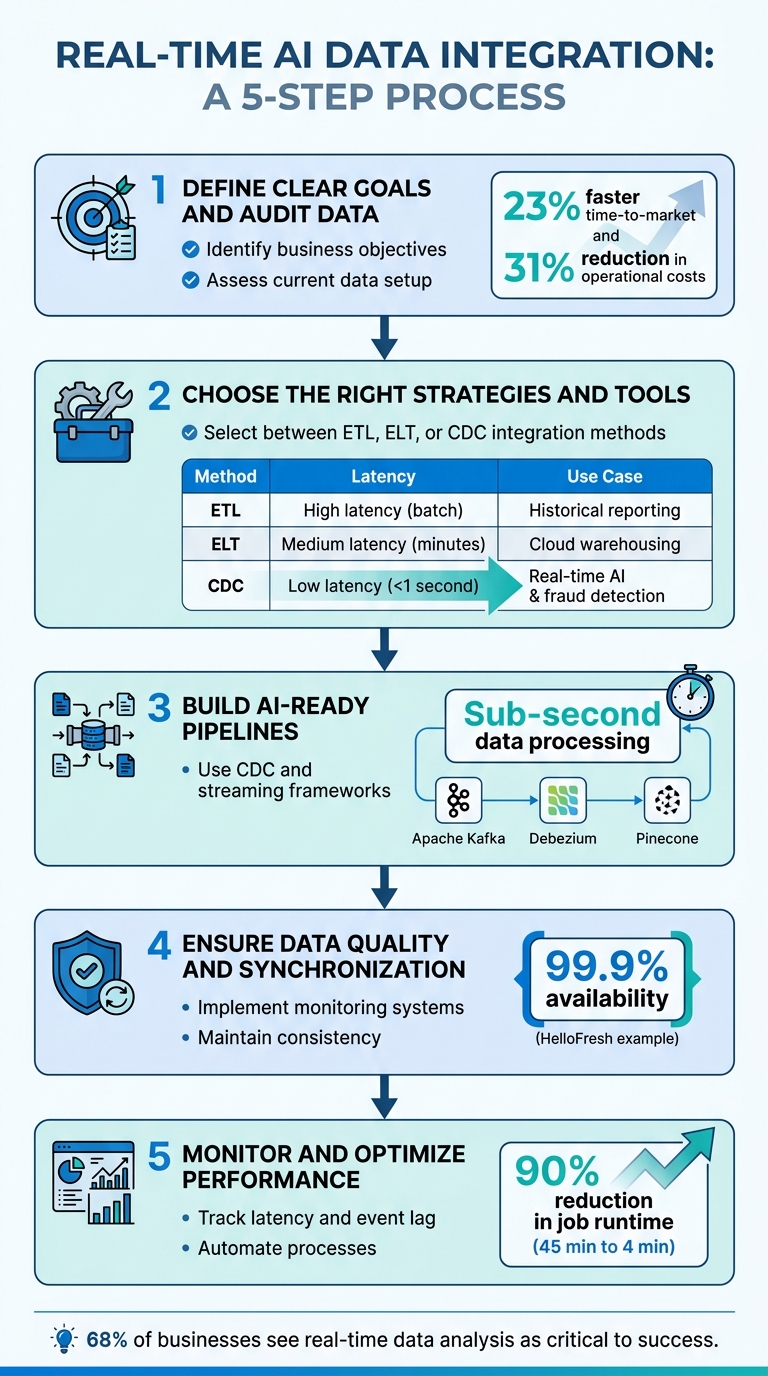
5-Step Real-Time AI Data Integration Process for SMEs
AI Meets Integration: Delivering AI Ready Data in Real Time
sbb-itb-c53a83b
Step 1: Define Business Goals and Audit Your Data
Before diving into real-time AI infrastructure, it’s essential to define your business challenges clearly. Focus on identifying the specific P&L metrics your AI efforts aim to influence. As Mario Peshev, CEO of DevriX, puts it: "If you can’t articulate the why & how with clear metrics, don’t buy the what".
Align AI Integration with Business Objectives
To ensure AI integration aligns with your goals, assign a senior executive to oversee the process and connect it directly to measurable P&L outcomes. Evaluate potential use cases by scoring business impact (1–10) and implementation feasibility (1–10). Aim for combined scores of 50 or higher.
The benefits of AI initiatives can be substantial, including labor savings, increased revenue, expanded capacity, and reduced risks. For example, companies that effectively integrate their data have reported a 23% faster time-to-market for new products and a 31% reduction in operational costs. Once your objectives are clear, the next step is to thoroughly audit your data.
Conduct a Data Audit
Assess your current data landscape to gauge readiness for real-time AI integration. This involves evaluating five key areas: Data Readiness, Process Maturity, Cultural Readiness, Technical Infrastructure, and Financial Capacity. At a minimum, you’ll need centralized CRM data, digital financial records, and at least 12 months of historical data.
Start by categorizing your data sources into three types: microservices events, database changes (requiring Change Data Capture or CDC), and SaaS data. Then, determine which data requires real-time access – like inventory levels, session behavior, or transactions – and which can be handled in batches, such as monthly demographics or historical trends. This distinction helps avoid unnecessary spending on infrastructure.
During the audit, look for gaps such as missing values, duplicate records, inconsistent formats, or schema drift. While perfect data is not a requirement, modern AI models can still perform well with centralized but imperfect datasets, like those from a CRM system. However, cleaning your data at the source is crucial. For instance, removing duplicate CRM records or outdated contacts ensures that poor data quality doesn’t undermine your real-time systems.
Step 2: Select Real-Time Data Integration Strategies and Tools
After completing your data audit in Step 1, the next step is to identify the most effective strategies and tools for real-time data integration. The key is to choose the right approach – ETL, ELT, or CDC – based on your specific needs, as each comes with its own strengths and challenges.
Understand Integration Strategies
ETL (Extract, Transform, Load) follows a structured process: data is extracted from sources, transformed in a staging area, and then loaded into the target system. This method ensures high data quality by applying transformations upfront, making it ideal for traditional reporting. However, the downside is its latency, which can stretch into hours.
ELT (Extract, Load, Transform) flips the process by first loading raw data into a cloud data warehouse (e.g., Snowflake or BigQuery) and then performing transformations using the warehouse’s processing power. This allows for faster ingestion and greater flexibility for exploratory analysis. While quicker than ETL, it operates on micro-batches, with latency ranging from minutes to hours.
CDC (Change Data Capture) focuses on capturing incremental changes – like inserts, updates, and deletes – by reading database transaction logs (e.g., PostgreSQL Write-Ahead Log or MySQL binlog). This approach is crucial for applications requiring real-time responses, such as fraud detection, where decisions often need to be made in under 50 milliseconds.
| Strategy | Latency | Source Impact | Best Use Case |
|---|---|---|---|
| ETL | High (batch) | Moderate | Historical reporting with complex transformations |
| ELT | Medium (micro-batch) (minutes to hours) |
Moderate | Cloud data warehousing with flexible schema-on-read |
| CDC | Very low (< 1 second) | Minimal (reads logs only) | Real-time AI, fraud detection, cache synchronization |
To summarize: pick CDC for lightning-fast updates, ELT for near-real-time flexibility, and ETL when prioritizing data quality over speed. Once your strategy is clear, the next step involves selecting the tools to bring it to life.
Evaluate Tools for Real-Time Integration
Choosing the right tools is just as important as defining your strategy. For small to medium-sized enterprises (SMEs) with limited engineering resources, managed connectors like Fivetran and Airbyte can save significant time and effort. These platforms handle common challenges like API rate limits, authentication changes, and schema drift, which can otherwise take months to address with custom-built solutions.
For event streaming, Apache Kafka is a go-to choice, acting as the backbone for asynchronous, fault-tolerant pipelines. However, managing Kafka clusters requires expertise, so managed services like Confluent Cloud or Amazon Kinesis are often better suited for SMEs.
If you’re using CDC, tools such as Striim, Debezium, and Streamkap excel at log-based extraction with sub-second latency. Pair these with stream processing frameworks like Apache Flink or Spark Streaming for advanced computations and aggregations. For ultra-fast data retrieval, consider storing real-time features in Redis, and for AI-driven similarity searches, explore vector databases like Pinecone and Qdrant.
When assessing tools, focus on these key factors:
- Integration compatibility: Does the tool connect seamlessly with your SaaS apps and databases?
- Operational demands: Can your team manage the tool, or is a managed service more practical?
- Schema evolution support: How well does the tool handle changes in data structure?
- Replication lag: For production AI, ensure replication lag stays below 10 seconds.
Step 3: Build AI-Ready Data Pipelines
Once your integration strategy and tools are in place, the next step is to create data pipelines that can deliver source data to AI models with near-instant speed and reliable accuracy. This involves leveraging techniques like Change Data Capture (CDC) and streaming to ensure minimal delays and consistent data flow.
Use Change Data Capture (CDC) and Streaming Pipelines
Log-based CDC is a method that tracks changes in your database without overloading your production systems. Instead of repeatedly querying for updates, CDC monitors your database’s write-ahead log or transaction log, capturing every INSERT, UPDATE, and DELETE as it happens. This reduces strain on your systems while ensuring fresh data is available in real time.
A practical strategy is to implement the outbox pattern. This involves recording business events in a dedicated table within the same transaction. Tools like Debezium can then capture these structured events, shielding downstream AI systems from schema changes.
"CDC is powerful because it lets applications subscribe to everything written to a database, which makes it useful for indexes, caches, recommendations, and replication." – Martin Kleppmann, Distributed Systems Researcher
A great example of this in action is HelloFresh. In May 2025, they built a real-time pipeline that streamed user behavior and operational events into Snowflake’s AI Data Cloud. The result? Their recommendation engine became highly responsive, achieving 99.9% availability while cutting data costs by 30%. Similarly, Picnic, a grocery delivery service, used real-time mobile data streaming to fuel their recommendation engine, contributing to a staggering 500% annual growth rate.
Once CDC captures the changes, a streaming backbone – using tools like Apache Kafka or Amazon Kinesis – ensures smooth data flow. This backbone acts as a buffer between data producers and AI consumers, keeping events safe even if the AI model slows down or needs retraining.
Prepare Data for AI Models
Capturing changes is just the first step. To make the data usable for AI models, it often needs transformation. A stream processing layer (e.g., Apache Flink or Kafka Streams) can handle tasks like aggregating data over time windows, filtering out noise, and enriching data in real time.
For instance, if a product’s inventory count fluctuates multiple times in a short span, collapsing these updates into a single event can save on API costs and reduce unnecessary updates to indexes.
Proper schema management is another critical component. Using a Schema Registry with formats like Avro or Protobuf helps enforce data consistency and avoid problems when source systems change their schema. Additionally, routing invalid records to a Dead Letter Queue ensures that errors don’t disrupt the entire pipeline.
For AI applications requiring similarity searches – such as recommendation engines – vector databases like Pinecone or Qdrant are invaluable. These databases are optimized for speed, achieving search latencies of 3–10 milliseconds (P95) across datasets with over 50 million vectors. JustWatch, for example, used such a setup to build 50 million fan profiles, enabling machine learning-driven trailer campaigns that doubled industry-average view times at half the cost.
Finally, a real-time feature store like Feast or Tecton can provide consistent features for both model training and inference. This eliminates discrepancies between training and production environments, with feature retrieval typically clocking in under 100 milliseconds. With this setup, your system is primed for real-time AI performance.
Step 4: Ensure Data Quality and Real-Time Synchronization
Building data pipelines is just the start – ensuring their reliability takes it to the next level. In batch systems, data errors might only show up hours later during scheduled runs. But in streaming systems, those errors can spread instantly, potentially throwing off your AI models with incorrect predictions. That’s why it’s crucial to design your architecture with data quality and synchronization in mind right from the start.
Implement Data Quality and Monitoring Systems
The first step in maintaining data quality is to enforce strict validation at the edge. Use schemas like Avro or Protobuf to validate data before it even enters the pipeline. This helps avoid schema drift, where unexpected changes in data structure upstream can disrupt downstream processes. Pair these schemas with data contracts – formal agreements that define the expected structure, data types, and validation rules between data producers and consumers.
Automated validation jobs are another must-have. These systems should flag anomalies in real time, such as missing fields, unexpected values, or numbers that fall outside acceptable ranges. Any data that fails validation should be sent to a Dead Letter Queue (DLQ) for immediate inspection. Assigning a unique identifier (UUID) to each event ensures idempotency, preventing duplicate processing.
Monitoring tools are equally important. Platforms like Prometheus and Grafana can help you track metrics such as broker throughput and consumer lag. OpenTelemetry provides distributed tracing, giving you visibility across your entire system. Normalize all timestamps to UTC during ingestion to maintain consistency, and store raw event payloads in durable queues like Redis Streams or Amazon SQS. This enables you to replay events in case of failures. With these systems in place, you’ll have a strong foundation for the next step: seamless synchronization.
Synchronize Data Across Systems
Once you’ve ensured data quality, the next challenge is to maintain these standards across all interconnected systems. Real-time synchronization isn’t just about speed – it’s about consistency. Event-driven architectures using tools like Apache Kafka or Amazon Kinesis are key here. These message brokers decouple producers from consumers, allowing systems to scale independently and handle backpressure. This setup prevents one slow service from clogging the entire pipeline.
Take HelloFresh as an example. In May 2025, they rolled out a real-time streaming pipeline using Snowplow and Snowflake’s AI Data Cloud. This system achieved 99.9% availability for metrics across their web, warehouse, and supply chain operations. Thanks to this setup, their recommendation engine could adjust to subscriber preferences within minutes. Similarly, Secret Escapes unified their cross-device event tracking into a single source of truth. This reduced data processing time by 25% and boosted personalized campaign conversions by 30%.
To keep everything aligned, regularly reconcile record counts and checksums between your source systems and your AI stores. Using a centralized feature store like Feast or Tecton ensures that the data format used for training matches what your models encounter in production. With these measures in place, your real-time AI systems will remain accurate, consistent, and ready to handle the demands of scaling.
Step 5: Monitor and Optimize Performance
Once your pipelines are set up, keeping a close eye on performance is essential. Without ongoing monitoring, small issues can snowball into major disruptions. The goal is to track the right metrics and automate processes wherever possible to maintain seamless operations.
Set Performance Metrics
Start by defining latency targets that align with your business goals. For instance, a fraud detection system might need response times under 100ms, whereas a customer dashboard could handle a few seconds of delay. Focus on four key latency metrics: ingestion latency (how long it takes to capture data), processing latency (time spent transforming data), storage latency (time to write data), and query latency (time for AI models to retrieve features).
Avoid relying on averages, as they can mask problems. Instead, use P95 or P99 metrics to spot bottlenecks in the slowest transactions. For example, a system with an average latency of 50ms but a P95 of 2 seconds has a significant issue. Additionally, monitor event lag, which measures the time gap between when an event occurs and when it’s processed. This ensures your AI models are working with up-to-date information.
Don’t stop at speed metrics – monitor data quality too. Keep an eye on schema violation rates to ensure only well-formed data reaches your models. Also, track consumer lag in message brokers like Kafka to catch bottlenecks before they escalate.
| Metric Category | Key Indicator | Why It Matters |
|---|---|---|
| Latency | Ingestion-to-Inference Time | Ensures decisions are based on current data, not outdated snapshots |
| Throughput | Events Per Second (EPS) | Confirms the system can handle growing data volumes |
| Data Quality | Schema Violation Rate | Prevents problems caused by inconsistent or malformed data |
| System Health | Consumer Lag | Identifies pipeline bottlenecks before they lead to larger failures |
| AI Accuracy | Model Drift Score | Detects when changes in real-time data require model retraining |
By tracking these metrics, you can ensure your system stays responsive, scalable, and reliable. These insights also support auto-scaling and error-handling strategies, which we’ll discuss next.
Use Automation and Scalability
To maintain reliability and efficiency, automation is key – manual intervention just can’t keep up. Use tools like Kubernetes to auto-scale ingestion workers based on queue depth or throughput. When data volumes spike, your system should adjust capacity automatically. Tools like Fivetran and Airbyte can automate schema detection and evolution, reducing the risk of pipeline failures when upstream data changes.
Set up automated dead-letter queues (DLQs) to handle failed events without disrupting the main data flow. Define retry thresholds so that problematic records are escalated after multiple failed attempts, rather than clogging the system. Implement idempotent processing with unique event IDs to ensure each data point is processed only once, even during retries.
Here’s an example: In March 2026, a global B2B payments platform serving over 1 million customers switched from full-table reloads to automated incremental processing. This change slashed their SQL job runtime by 90%, cutting it from 45 minutes to under 4 minutes. It also reduced CRM synchronization cycles by 30%. These kinds of optimizations show how automation can dramatically improve efficiency.
It’s worth noting that 68% of businesses see real-time data analysis as critical to their success. However, because real-time infrastructure can be costly, it’s best to reserve streaming for high-value, time-sensitive workflows like personalization or fraud detection. Lower-priority data can still be handled effectively in batch pipelines.
"Real-time integration succeeds when it is aligned to business-critical responsiveness – not when it is adopted for technical prestige."
– Perceptive Analytics
Conclusion and Next Steps for SMEs
Key Takeaways
Integrating real-time AI into your business infrastructure can significantly enhance responsiveness and efficiency, especially for workflows that are time-sensitive or high-value, like fraud detection or dynamic pricing. This guide lays out five practical steps to help you get started:
- Set clear business goals and evaluate your current data landscape.
- Choose the right tools and strategies for AI integration.
- Develop AI-ready pipelines using methods like Change Data Capture (CDC) and streaming.
- Maintain data quality through consistent monitoring and synchronization.
- Continuously improve performance with automation.
For less time-sensitive or static processes, stick to batch operations to avoid unnecessary complexity.
Instead of diving into a full-scale transformation, start small with a high-impact pilot project. For example, switching from full-table reloads to incremental CDC-based processing can cut SQL job runtimes by 90% and reduce CRM synchronization times by 30%. This approach not only simplifies integration but also lays the groundwork for long-term success.
How Growth Shuttle Can Help
If you’re an SME ready to take the next step, having the right support can make all the difference. Studies show 78% of SME leaders lack in-house AI expertise, and poor data quality can reduce AI accuracy by up to 80%. That’s where Growth Shuttle steps in.
Under the leadership of Mario Peshev, author of MBA Disrupted and a serial entrepreneur, Growth Shuttle specializes in providing fractional executive support tailored for CEOs managing teams of 15–40. Their advisory plans, starting at $600 per month, are designed to bridge the gap between technical challenges and operational needs. Whether you need monthly strategic advice or ongoing "Executive in Residence" guidance for complex integrations, Growth Shuttle focuses on creating modular, cost-effective solutions that deliver measurable results. With the right strategy, AI implementation can boost productivity by up to 37%.
FAQs
Which data should be real-time vs batch?
Real-time data shines in scenarios where immediate updates are critical – think live customer support, fraud detection systems, supply chain adjustments, or monitoring operational metrics. On the other hand, batch processing is more suited for data that doesn’t require constant updates, like generating historical reports, compiling monthly summaries, or preparing training datasets for machine learning models. Simply put, real-time data supports quick decisions, while batch processing is ideal for periodic analysis and long-term planning.
Should I use ETL, ELT, or CDC?
When deciding on a method for real-time AI data integration, it comes down to your specific needs:
- ELT works best with modern cloud warehouses. It focuses on loading raw data first, giving you the flexibility to transform it as needed later.
- CDC specializes in capturing real-time changes, ensuring your AI pipelines stay updated with the latest data.
- Traditional ETL, however, falls short for real-time scenarios since it relies on batch updates, making it slower and less responsive.
A smart approach? Combine CDC with ELT. This combo provides a continuous data flow while keeping your AI pipelines fresh and ready for action.
What metrics prove the pipeline is working?
Key metrics to keep an eye on include real-time data ingestion rates, system latency, and data freshness – all vital for maintaining a steady flow of information into AI systems. It’s also important to assess pipeline performance by looking at the accuracy and responsiveness of AI models. For example, achieving sub-100ms feature retrieval and avoiding training-serving skew are strong indicators of effectiveness. Additionally, tracking throughput and error rates helps ensure the pipeline is running smoothly and efficiently.
Related Blog Posts
- Best Practices for Real-Time AI Monitoring
- How AI Monitoring Improves Business Operations
- 4-Step AI Framework for SME Growth Decisions
- Common Data Migration Challenges and AI Solutions
The post 5 Steps for Real-Time AI Data Integration appeared first on Growth Shuttle.



![Madonna – Who’s That Girl (1987/2020) [FLAC 24bit/192kHz]](http://imghd.xyz/images/2023/06/08/0093624951148_6004dceff9e1db710a9.jpg)


